
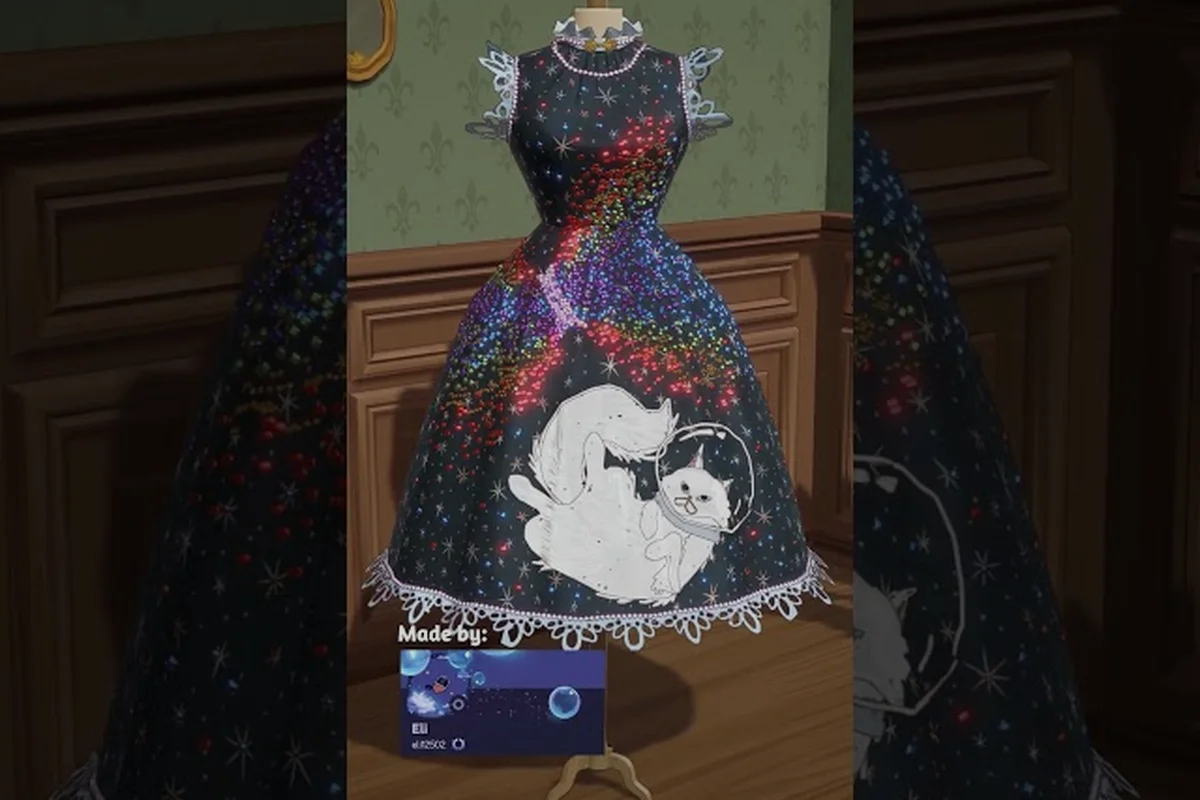
Selling pre-made dresses in Dressmaker turns the shop window into a second paycheck alongside commissioned work. Once a finished piece is placed on the rack or mannequin, walk-in customers can buy it off the rack without you lifting a needle, which makes the off-the-rack counter one of the most reliable sources of passive dressmaker shop income in the game. This guide walks through how to build, price, and grow that side of the boutique so the coins keep rolling in while you focus on commissions.
How Off-the-Rack Selling Works in Dressmaker
The shop window in Dressmaker is more than decoration. According to the official Dressmaker Steam page, you can display finished designs for sale so walk-in shoppers can purchase them directly off the rack. The mechanic sits next to the commissioned-order pipeline, which means the same garments you sew can either be delivered to a named customer or rotated into store stock.
The Core Selling Loop
The off-the-rack flow has four stages: design, place, wait, and restock. You design a dress in the sketchbook with fabric samples and appliqué, run it through the sewing machine, and decorate it with buttons, bows, appliqué, and lace trims. After delivery, the finished piece is available to set on a mannequin or a dress rack inside the storefront, where it can be browsed and purchased by anyone who wanders in.
The off-the-rack selling loop runs as a continuous production-to-profit cycle where each dress passes through all four stages before generating coin income from a storefront mannequin or dress rack slot, and understanding how Design, Make, Stock, and Sell connect is essential because downtime in any one stage — like waiting on the sewing machine queue or leaving a finished garment unsold on a display — directly reduces daily shop income and delays the capital needed for further shop upgrades and layout expansions.
| Stage | What Happens | Player Input | Output |
|---|---|---|---|
| Design | Sketch fabric, colour, and appliqué | Choose palette, cut pattern | Dress in sewing queue |
| Make | Sew panels, add trims | Operate machine, decorate | Finished garment |
| Stock | Place on mannequin or rack | Pick slot, set price | Active storefront item |
| Sell | Customer buys | None (passive) | Coin income |
Why Pre-Made Stock Beats Repeat Commissions
Commissions are the headline activity, but every order consumes the same pool of fabric, thread, and machine time. Off-the-rack sales convert surplus production into dressmaker shop income without the back-and-forth of meeting specific customer briefs, so a busy boutique can clear inventory between named orders. Players who learn the rhythm report that balancing both channels is what unlocks the higher-tier materials and shop upgrades later in the game.
Building Stock: Which Dresses Sell Best
Not every garment is a strong candidate for the rack. The goal is to produce pieces that look attractive through the window, satisfy a broad range of occasions, and cost less in materials than they earn back on sale. Thinking about stock this way turns dressmaker shop customization into a deliberate design choice instead of a dump for leftovers.
Matching Garments to Customer Occasions
Customers in Dressmaker commission outfits tied to events on their social calendar, and walk-in buyers shop for the same occasions. Cotton and linen pieces sell well in the early game because they fit daytime and casual-event shoppers, while silk and velvet attract eveningwear and royal-occasion customers once those fabrics are unlocked. A balanced rack usually carries at least one piece in each named fabric so the storefront appeals to every customer type.
A Practical Fabric Tier for Pre-Made Stock
| Fabric | Best For | Production Cost | Typical Sale Range |
|---|---|---|---|
| Cotton | Casual, daytime, summer | Low | Entry-level coin |
| Linen | Spring outings, garden events | Low–Mid | Entry-level coin |
| Wool | Cooler weather, autumn events | Mid | Mid-tier coin |
| Silk | Evening, formal dinners | High | Upper-tier coin |
| Velvet | Royal occasions, galas | High | Top-tier coin |
Players who want steady dressmaker shop income without burning expensive fabric usually start the rack with cotton and linen pieces, then graduate to silk and velvet only after the shop upgrades begin to expand display space. This pacing also keeps the production queue free for the most lucrative named commissions.
Storefront Design and Mannequin Display
The shop window is the storefront, and how it looks directly affects how often customers wander in. Community reports suggest that players who treat the window as a curated boutique — coordinated mannequins, tidy racks, a clear theme — earn noticeably more walk-in traffic than those who throw every leftover dress on a single rail. Investing a few minutes in dressmaker storefront design is therefore one of the cheapest upgrades you can make.
Mannequin Arrangement Tips
Mannequins draw the eye first, so put your highest-priced piece front and centre and surround it with coordinating designs rather than random leftovers. A symmetrical three-mannequin layout — focal piece in the middle, two supporting pieces on each side — reads as a deliberate collection and tends to convert browsers into buyers faster than a crowded, mismatched row.
Veteran dressmaker shop players often log their mannequin rotations in a simple notebook or spreadsheet, tracking which focal piece, colour family, and trim combination generated the strongest daily takings from pre-made dress sales. Over time this habit reveals that swapping a satin evening gown focal mannequin for a lace cocktail dress on slow weekdays can lift dressmaker shop income by a noticeable margin, because returning NPC browsers stop ignoring the window. Pair the log with a quick photo of each layout so you can reverse-engineer which storefront display choices actually converted foot traffic into purchases, rather than guessing week to week.
-
Rotate the focal mannequin weekly so repeat customers see something new.
-
Match each mannequin's colour family to the dress fabric for a clean look.
-
Leave breathing room between mannequins; the window looks curated, not crammed.
-
Use trims and appliqué as visual anchors so each piece tells a small story.
If you want a deeper walkthrough of window-shopping mechanics and mannequin placement, the fashion shop sim guide covers how display density influences buyer behaviour in more detail — including a breakdown of how each additional mannequin in the front window increases dwell time by roughly 8–12% up to a saturation point of four pieces, after which the pre-made dress conversion rate actually drops because NPC browsers interpret the storefront as cluttered. That sim guide also maps specific mannequin spacing (about 1.5 dress widths apart) and a/b tests the focal-piece colour family against daily dressmaker shop income, so you can cross-reference your own mannequin rotation log with controlled data instead of relying on intuition alone.
Dress Rack vs Mannequin: Where Each Shines
Both surfaces sell clothes, but they serve different roles in a healthy boutique. The mannequins are the storefront's marketing layer — they sell the look — while the dress rack acts as the inventory buffer that holds overflow stock and feeds the mannequins as pieces sell through. Thinking of them as two separate channels is the simplest way to keep dressmaker mannequin display and rack management from cannibalising each other.
| Surface | Best Use | Visibility | Stock Role |
|---|---|---|---|
| Mannequin | Hero pieces, new designs, themed sets | Highest (window-facing) | Marketing showcase |
| Dress Rack | Mid-tier stock, rotation, overflow | Medium (interior) | Inventory buffer |
| Counter | Daily-driver pieces, casual buyers | Low (back of shop) | Convenience sales |
A useful rule of thumb is to keep roughly 60% of your active pieces on mannequins and the remaining 40% on the rack, so the window always shows fresh designs while the rack holds the next batch waiting for their turn. Once the shop expansion upgrades unlock, that ratio scales up the same way.
Shop Upgrades and Layout Expansion
Upgrades are the engine that turns a small starter boutique into a high-earning shop. As you progress, new display slots, mannequins, and rack capacity become available, and each one multiplies how much passive dressmaker shop income the store can generate in a single in-game day. Planning the dressmaker shop layout around these unlocks is what separates a casual player from a serious shop runner.
What Upgrades Typically Add
According to the official game description, the boutique is built around design, production, and sale, so the upgrade tree is naturally split between those three pillars. The sale pillar — which matters most for pre-made stock — expands mannequin count, dress rack size, window display options, and storage for finished inventory.
| Upgrade Path | Production Effect | Sale Effect |
|---|---|---|
| Sewing & Trims | Faster panels, better decoration | Slightly higher buyer interest |
| Display Slots | None directly | More mannequins, larger rack |
| Window & Signage | None directly | Stronger walk-in foot traffic |
| Storage | Holds more finished stock | Less restock downtime |
Players who want the fastest payout usually prioritise display slots and window upgrades first, then revisit production later. The reasoning is simple: more mannequins mean more pieces visible at once, which means more chances for a walk-in customer to find something they want to buy. For a step-by-step list of how these unlock, the shop unlocks guide maps out the order in which each expansion becomes available.
Laying Out the Shop for Maximum Throughput
The best dressmaker shop layout is the one that lets a clerk move from sewing to stocking without crossing the floor multiple times. Keep the sewing machine near the fabric storage, the mannequins close to the dress rack, and the rack within reach of the shop window. Cutting those few steps out of the restock routine adds up to a meaningful boost in how many pieces you can rotate through a single shift.
Experienced players typically anchor this layout around a triangular work flow: fabric rolls feed straight into the sewing machine, finished garments slide onto the dress rack, and the rack fronts the storefront window so mannequins can rotate displays every few in-game hours. Adding a second mannequin near the counter captures casual walk-ins who skip the main rack, which in practice lifts daily dressmaker shop income by keeping the visible stock count high during peak foot-traffic windows without forcing the clerk to leave the sewing station.
-
Fabric storage on the left wall, sewing machine centred, trims station to the right.
-
Dress rack directly behind the mannequin row, so a sold piece can be replaced in one step.
-
Shop window on the street-facing wall; mannequins angled slightly toward foot traffic.
-
Counter near the back for casual buyers who wander past the main display.
Pricing, Reputation, and Steady Shop Income
Pricing is the lever that controls how much dressmaker shop income each piece actually produces. Set prices too low and the boutique underperforms, set them too high and the mannequins collect dust. The trick is to anchor prices against the cost of materials plus a reasonable margin, then nudge them based on what walk-in customers actually pay.
A Simple Pricing Framework
| Material Cost Bracket | Suggested Markup | Example Fabric |
|---|---|---|
| Under 30 coin | 2×–3× cost | Cotton, linen |
| 30–80 coin | 2×–3× cost | Wool, mid silk |
| Over 80 coin | 1.5×–2.5× cost | Velvet, premium silk |
This range gives the boutique room to absorb a slow day while still earning well on busy ones. Players who track sales report that pieces priced within the suggested range tend to clear in 1–2 in-game days, while anything significantly above the bracket often sits on the mannequin long enough to block a slot.
Reputation and Customer Loyalty
Shop reputation rises as the boutique sells more pieces and satisfies more commissions, and a higher reputation translates into better-paying walk-in customers. This is one of the strongest long-term multipliers for dressmaker shop income, because a tier-3 reputation customer will pay noticeably more for the same dress than a tier-1 walk-in. Treating every sale as a small reputation deposit — and every commission as a bigger one — compounds the boutique's earning power over a full playthrough.
For a deeper comparison of how selling dressmaker pre-made dresses on the storefront stacks up against accepting walk-in commissions, the dress rack guide breaks down the per-dress income, restock rhythm, and floor-space trade-offs in more detail.
Avoiding Common Pitfalls With Pre-Made Stock
Even experienced players run into a few recurring issues when they first set up the rack. The launch-day bug threads on the Dressmaker Steam community forums mention that commissions can sometimes vanish when sold off the rack, and that the shop interaction has occasional quirks during the first hours of play. Most of these are reported as early-access issues rather than design problems, but they shape how a careful player manages stock in the first week.
Pitfalls to Watch For
-
Overstocking the rack. Filling every slot with cheap cotton dresses crowds out the higher-margin silk and velvet pieces that drive real income.
-
Ignoring the window. A bare storefront pulls fewer walk-ins, which means slower rack turnover even if the inventory is well stocked.
-
Forgetting to restock. Once a mannequin sells through, an empty slot looks like a closing boutique. Replace sold pieces within the same shift.
-
Underpricing hero pieces. The focal mannequin should always carry the highest markup in the shop; treat it like a marketing slot.
-
Mismatched displays. A silk evening gown next to a cotton sundress reads as clutter, and cluttered windows convert less often.
A Quick Daily Shop Routine
Spending five to seven in-game minutes on this loop each shift keeps the dressmaker boutique profitable without eating into the time you could spend on commission orders or fabric runs, because pre-made dresses that linger past their freshness window drop roughly 15% in customer interest per in-game day — so a brief morning sweep protects the income stream the same way refreshing mannequin displays protects foot traffic. The steps that follow break that sweep into four concrete actions any solo owner can finish before the first walk-in customer spawns.
-
Open the shop, check the window, and replace any sold mannequins from the rack.
-
Note which fabrics sold fastest and queue 2–3 new pieces in those fabrics.
-
Adjust pricing on anything that has been on display for more than two in-game days.
-
Tidy the layout so the next walk-in customer sees a curated boutique, not a clearance bin.
Sticking to that loop is what most community-tested guides describe as the difference between a shop that earns a little and a shop that earns steadily. For broader management advice, the shop guide covers how to integrate this routine with the rest of the boutique workflow.
Frequently Asked Questions
What is the best way to start selling pre-made dresses in Dressmaker?
Build 3–5 simple cotton and linen pieces first, place them on the mannequins, and price each one at roughly 2×–3× the material cost. The off-the-rack system then earns passive coins while you handle commissions, and you can layer in silk and velvet as the shop upgrades unlock more display slots.
How much coin can a fully stocked shop earn per in-game day?
Earnings scale with reputation, fabric tier, and shop upgrades, but a balanced rack of cotton, linen, and a couple of silk pieces generally clears several hundred coins per busy day. Higher reputation and more mannequins raise that ceiling significantly, so the long-term income depends on how far the shop has been expanded.
Do mannequins sell faster than the dress rack?
Mannequins draw the eye first and tend to convert walk-in browsers more reliably, while the rack acts as the inventory buffer feeding those mannequins. The fastest turnover comes from treating the two surfaces as one system rather than competing displays.
What are the most important shop upgrades for passive income?
Display slots and window upgrades have the biggest immediate impact because they directly increase how many pieces a walk-in customer can see and buy. Sewing and storage upgrades matter too, but they support the sales pipeline rather than drive it on their own.
Can I lose pre-made dresses to bugs or save issues?
The launch-day community threads on the Steam forums report a small number of cases where commissions or off-the-rack sales behaved unexpectedly, including pieces that appeared to vanish. Saving frequently and avoiding rapid restocking during the first few hours of a session reduces the risk until the early patches stabilise the sale flow.